Friday, May 22, 2015
Monday, February 2, 2015
SharePoint Designer "failed to load this workflow" or Windows Workflow Foundation, part of .Net Framework 3.0, must be installed to use this feature.
To resolve this issue please update your designer with the hotfixes in sequence. Make sure the designer is NOT open.
http://support2.microsoft.com/hotfix/KBHotfix.aspx?kbnum=2837667&kbln=en-us
http://support2.microsoft.com/hotfix/KBHotfix.aspx?kbnum=2727100&kbln=en-US
Once installation is complete open the site once again. A restart may not be necessary. If you still get the same issue then clear your designer cache by running this
rmdir "%LOCALAPPDATA%\Microsoft\WebsiteCache\"
/s /q
rmdir "%APPDATA%\Microsoft\SharePoint
Designer\ProxyAssemblyCache\"
/s /q
Then Restart you PC.
Wednesday, January 7, 2015
Enable site publishing feature and apply master page on SharePoint sub sites including Office 365
In this blog I will go over how to create a sandboxed event receiver which will activate the "Publishing Feature" and inherit master page from parent. (Thanks to Anvesh Kunati and Alex Mayer)
This sandboxed solution will work on SharePoint 2013 and SharePoint Online/365
Steps
1. Fire up a visual studio, if you are using VS 2012 then you may have to download Office 365 Tools for VS 2012. Create a new SharePoint 2013 projects
This sandboxed solution will work on SharePoint 2013 and SharePoint Online/365
Steps
1. Fire up a visual studio, if you are using VS 2012 then you may have to download Office 365 Tools for VS 2012. Create a new SharePoint 2013 projects
2. Name the solution accordingly
3. Point to the SharePoint Site(has to be a local site)later on we can copy this WSP to SharePoint Online.
4. Click on the validate and choose "Sandbox Solution" as the option
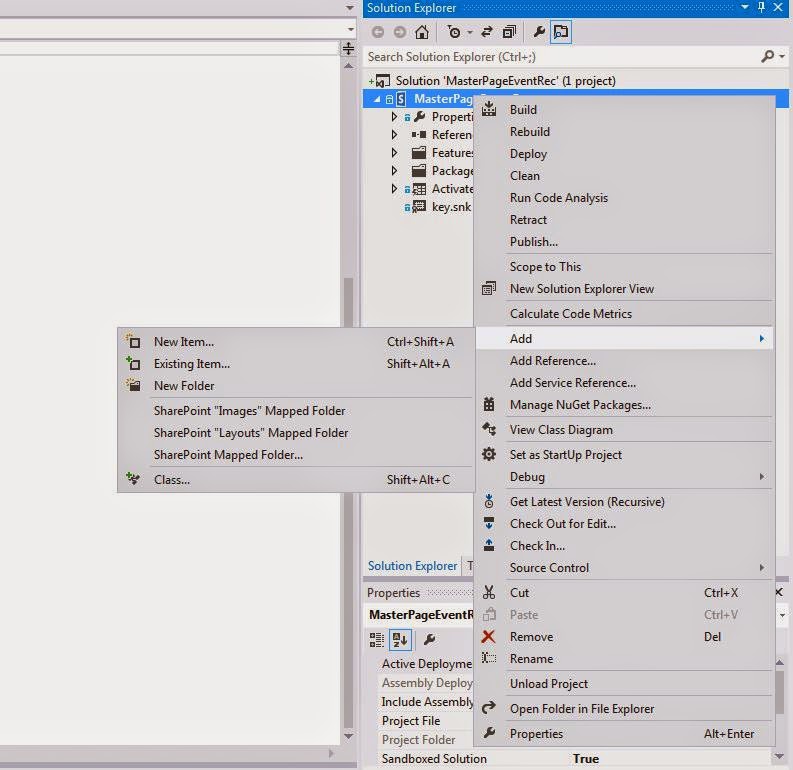
5. On the VS Project right click on the solution and add a new item choose "Event Receiver"
6. Name it accordingly because changing it later can become frustrating.
7. From the popup choose Web Events and choose A Site was provisioned
8. In the event receiver code add the following code within public override void WebProvisioned(SPWebEventProperties properties)
base.WebProvisioned(properties);
SPWeb web = properties.Web;
web.AllowUnsafeUpdates = true;
//activating Publishing feature. If you need any other features to be activated the put those GUID's
web.Features.Add(new Guid("{94c94ca6-b32f-4da9-a9e3-1f3d343d7ecb}"), true);
web.Update();
// add a description toshow that its running/to check if this worked
// web.Description = "Feature activated log";
// web.Update();
SPWeb rootWeb = web.Site.RootWeb;
//Inherit the master and custom master page from root site
web.MasterUrl = rootWeb.MasterUrl;
web.CustomMasterUrl = rootWeb.CustomMasterUrl;
//Set navigation
web.Navigation.UseShared = true;
web.Update();
web.AllowUnsafeUpdates = false;
web.Dispose();
rootWeb.Dispose();
9. Compile/Build and deploy to the local site. In the properties make sure it is selected as sandbox solution.
10. Go to the site features and activate this new feature
11. This is a reusable solution and the WSP can be uploaded to any site collection or Office 365 SharePoint sites.. Just download the WSP from the local SharePoint site solution gallery and upload to any new site collection.
Alternatively you can also get the latest WSP by right clicking the VS solution and opening the solution in "file explorer", bin folder Debug/Release folder
Thursday, May 2, 2013
Encrypt InfoPath Fields - SharePoint 2010 Web Browser Enabled Forms
As InfoPath stores all the information in an open XML format it is easy for a little technical users to download the form to the client and read the xml and its values.
In this post I will go over How to encrypt fields in InfoPath Form and How to upload the InfoPath Code Behind form to a form library.
For one of our requirements we had a requirement to secure or encrypt some of the compensation information that HR is to fillout on a SharePoint 2010 InfoPath Web Form/Online. Encryption of the fields help to secure the data so that when someone downloads the InfoPath 2010 form on their client what they say is encrypted data.
Just to let you know that I am just encrypting the compensation section and all fields in them. Other fields are not encrypted.
Here are the steps
using Microsoft.Office.InfoPath;
using System;
using System.IO;
using System.Security.Cryptography;
using System.Text;
using System.Xml;
using System.Xml.XPath;
namespace HR_Status_Form_Codebehind
{
public partial class FormCode
{
// Member variables are not supported in browser-enabled forms.
// Instead, write and read these values from the FormState
// dictionary using code such as the following:
//
// public string encryptionkey
//{
// get
// {
// return FormState["encryptionkey"];
// }
// set
// {
// FormState["encryptionkey"] = "r67$f#8gyv";
// }
// }
//private string Location
//{
// get
// {
// return (string)FormState["Location"];
// }
// set
// {
// FormState["Location"] = value;
// }
//}
// NOTE: The following procedure is required by Microsoft InfoPath.
// It can be modified using Microsoft InfoPath.
#region Security Methods
private string EncryptField(SymmetricAlgorithm SymmetricKey, string ValueToEncrypt)
{
string base64enc = string.Empty;
byte[] dataToEncrypt = Encoding.Unicode.GetBytes(ValueToEncrypt);
MemoryStream ms = new MemoryStream();
CryptoStream csBase64 = new CryptoStream(
ms, new ToBase64Transform(), CryptoStreamMode.Write);
CryptoStream csRijndael = new CryptoStream(
csBase64, SymmetricKey.CreateEncryptor(), CryptoStreamMode.Write);
csRijndael.Write(dataToEncrypt, 0, (int)dataToEncrypt.Length);
csRijndael.FlushFinalBlock();
base64enc = Encoding.ASCII.GetString(ms.GetBuffer(), 0, (int)ms.Length);
return base64enc;
}
private string DecryptField(SymmetricAlgorithm SymmetricKey, string ValueToDecrypt)
{
string unencryptedString = string.Empty;
byte[] dataToDecrypt = Convert.FromBase64String(ValueToDecrypt);
MemoryStream ms = new MemoryStream();
CryptoStream csRijndael = new CryptoStream(
ms, SymmetricKey.CreateDecryptor(), CryptoStreamMode.Write);
csRijndael.Write(dataToDecrypt, 0, (int)dataToDecrypt.Length);
csRijndael.FlushFinalBlock();
unencryptedString = Encoding.Unicode.GetString(
ms.GetBuffer(), 0, (int)ms.Length);
return unencryptedString;
}
private SymmetricAlgorithm GenerateKey()
{
string saltValue = "CreateYourOwn";
SymmetricAlgorithm symmKey = new RijndaelManaged();
byte[] saltValueBytes = Encoding.ASCII.GetBytes(saltValue);
PasswordDeriveBytes passwordKey = new PasswordDeriveBytes("CreateYourOwn", saltValueBytes, "SHA1", 3);
symmKey.Key = passwordKey.GetBytes(symmKey.KeySize / 8);
symmKey.IV = passwordKey.GetBytes(symmKey.BlockSize / 8);
return symmKey;
}
#endregion
public void InternalStartup()
{
EventManager.FormEvents.Loading += new LoadingEventHandler(FormEvents_Loading);
((ButtonEvent)EventManager.ControlEvents["Encrypt"]).Clicked += new ClickedEventHandler(Encrypt_Clicked);
((ButtonEvent)EventManager.ControlEvents["Decrypt"]).Clicked += new ClickedEventHandler(Decrypt_Clicked);
((ButtonEvent)EventManager.ControlEvents["hrsubmit"]).Clicked += new ClickedEventHandler(hrsubmit_Clicked);
}
public void GenericFormSubmit(object sender, SubmitEventArgs e)
{
EncryptData();
}
#region private methods
private void SetErrorMessage(string message)
{
XPathNavigator root = MainDataSource.CreateNavigator();
root.SelectSingleNode("/my:myFields/my:errorMessage",
NamespaceManager).SetValue(message);
}
private void ClearErrorMessage()
{
XPathNavigator root = MainDataSource.CreateNavigator();
root.SelectSingleNode("/my:myFields/my:errorMessage",
NamespaceManager).SetValue(String.Empty);
}
#endregion
public void FormEvents_Loading(object sender, LoadingEventArgs e)
{
try
{
XPathNavigator root = MainDataSource.CreateNavigator();
// Copy the XML structure for the protectedFields node with empty values
string emptyProtectedFields = root.SelectSingleNode(
"/my:myFields/my:Compensation", NamespaceManager).OuterXml;
if (root.SelectSingleNode("/my:myFields/my:emptyProtectedFields", NamespaceManager).Value == string.Empty || root.SelectSingleNode("/my:myFields/my:emptyProtectedFields",
NamespaceManager).Value == "")
{
// Store the XML structure in the emptyProtectedFields node
root.SelectSingleNode("/my:myFields/my:emptyProtectedFields",
NamespaceManager).SetValue(emptyProtectedFields);
}
}
catch (Exception ex)
{
SetErrorMessage(ex.Message);
}
}
public void ClearCompensationInformation()
{
XPathNavigator root = MainDataSource.CreateNavigator();
string emptyProtectedFields = root.SelectSingleNode(
"/my:myFields/my:emptyProtectedFields", NamespaceManager).Value;
XPathNavigator container = root.SelectSingleNode(
"//my:Compensation", NamespaceManager);
container.ReplaceSelf(emptyProtectedFields);
}
public void Encrypt_Clicked(object sender, ClickedEventArgs e)
{
try
{
EncryptData();
}
catch (Exception ex)
{
SetErrorMessage(ex.Message);
}
}
public void EncryptData()
{
try
{
ClearErrorMessage();
XPathNavigator root = MainDataSource.CreateNavigator();
// Generate the encryption
SymmetricAlgorithm symmKey = GenerateKey();
// Retrieve and encrypt the sensitive fields
string dataToEncrypt = root.SelectSingleNode("/my:myFields/my:Compensation", NamespaceManager).OuterXml;
root.SelectSingleNode("/my:myFields/my:encryptedData", NamespaceManager).SetValue(EncryptField(symmKey, dataToEncrypt));
// Encrypt the isLocked field
root.SelectSingleNode("/my:myFields/my:isLocked",
NamespaceManager).SetValue("locked");
// root.SelectSingleNode("/my:myFields/my:Compensation/my:salery",
// NamespaceManager).SetValue("0");
// root.SelectSingleNode("/my:myFields/my:Compensation/my:hourly",
//NamespaceManager).SetValue("0");
// Do not save the password; empty the password field
// root.SelectSingleNode("/my:myFields/my:password",
// NamespaceManager).SetValue(String.Empty);
// Empty the protected fields node
string emptyProtectedFields = root.SelectSingleNode(
"/my:myFields/my:emptyProtectedFields", NamespaceManager).Value;
XPathNavigator container = root.SelectSingleNode(
"//my:Compensation", NamespaceManager);
container.ReplaceSelf(emptyProtectedFields);
SetErrorMessage("Compensation information is encrypted! Please click the unlock button to view the information");
}
catch (Exception ex)
{
SetErrorMessage(ex.Message);
}
}
public void ShowDecryptedData()
{
try
{
ClearErrorMessage();
XPathNavigator root = MainDataSource.CreateNavigator();
// Retrieve the password entered by the user and generate a key
SymmetricAlgorithm symmKey = GenerateKey();
// Retrieve the encrypted data
string encryptedData = root.SelectSingleNode(
"/my:myFields/my:encryptedData", NamespaceManager).Value;
// Try to decrypt the data
string decryptedData = DecryptField(symmKey, encryptedData);
// Put the decrypted data in the protectedFields node
XPathNavigator container = root.SelectSingleNode(
"//my:Compensation", NamespaceManager);
container.ReplaceSelf(decryptedData);
// Empty the isLocked and password fields
root.SelectSingleNode("/my:myFields/my:isLocked",
NamespaceManager).SetValue("unlocked");
SetErrorMessage("The data is now decrypted. It is advised to encrypt it info before submitting the form. ");
}
catch (CryptographicException ex)
{
//string msg = "Either the password you entered is incorrect ";
//msg += "or you are not authorized to view the protected data.";
SetErrorMessage(ex.Message);
}
catch (Exception ex)
{
string msg = "The InfoPath form has been tampered with; ";
msg += "cannot unprotect the data.";
SetErrorMessage(msg + ex.Message);
}
}
public void Decrypt_Clicked(object sender, ClickedEventArgs e)
{
ShowDecryptedData();
}
public void hrsubmit_Clicked(object sender, ClickedEventArgs e)
{
// Write your code here.
}
}
}
In this post I will go over How to encrypt fields in InfoPath Form and How to upload the InfoPath Code Behind form to a form library.
For one of our requirements we had a requirement to secure or encrypt some of the compensation information that HR is to fillout on a SharePoint 2010 InfoPath Web Form/Online. Encryption of the fields help to secure the data so that when someone downloads the InfoPath 2010 form on their client what they say is encrypted data.
Just to let you know that I am just encrypting the compensation section and all fields in them. Other fields are not encrypted.
Here are the steps
- Create a Picture Button (rules and custom code) type and set the ID as Encrypt.
- Create a Picture Button (rules and custom code) type and set the ID as Decrypt.
- You can set the picture to these buttons if needed.
- Right click on the button and go to properties and click on Edit Form Code
- My fields in the infopath compensation area look like this
- Create some extra Text fields on the form root section that we would use for the encryption purpose
- This is the code you need for the whole encryption and decryption to work. If you are familiar with C# then all function should be self explanatory
- This is the complete code in the code behind.
using Microsoft.Office.InfoPath;
using System;
using System.IO;
using System.Security.Cryptography;
using System.Text;
using System.Xml;
using System.Xml.XPath;
namespace HR_Status_Form_Codebehind
{
public partial class FormCode
{
// Member variables are not supported in browser-enabled forms.
// Instead, write and read these values from the FormState
// dictionary using code such as the following:
//
// public string encryptionkey
//{
// get
// {
// return FormState["encryptionkey"];
// }
// set
// {
// FormState["encryptionkey"] = "r67$f#8gyv";
// }
// }
//private string Location
//{
// get
// {
// return (string)FormState["Location"];
// }
// set
// {
// FormState["Location"] = value;
// }
//}
// NOTE: The following procedure is required by Microsoft InfoPath.
// It can be modified using Microsoft InfoPath.
#region Security Methods
private string EncryptField(SymmetricAlgorithm SymmetricKey, string ValueToEncrypt)
{
string base64enc = string.Empty;
byte[] dataToEncrypt = Encoding.Unicode.GetBytes(ValueToEncrypt);
MemoryStream ms = new MemoryStream();
CryptoStream csBase64 = new CryptoStream(
ms, new ToBase64Transform(), CryptoStreamMode.Write);
CryptoStream csRijndael = new CryptoStream(
csBase64, SymmetricKey.CreateEncryptor(), CryptoStreamMode.Write);
csRijndael.Write(dataToEncrypt, 0, (int)dataToEncrypt.Length);
csRijndael.FlushFinalBlock();
base64enc = Encoding.ASCII.GetString(ms.GetBuffer(), 0, (int)ms.Length);
return base64enc;
}
private string DecryptField(SymmetricAlgorithm SymmetricKey, string ValueToDecrypt)
{
string unencryptedString = string.Empty;
byte[] dataToDecrypt = Convert.FromBase64String(ValueToDecrypt);
MemoryStream ms = new MemoryStream();
CryptoStream csRijndael = new CryptoStream(
ms, SymmetricKey.CreateDecryptor(), CryptoStreamMode.Write);
csRijndael.Write(dataToDecrypt, 0, (int)dataToDecrypt.Length);
csRijndael.FlushFinalBlock();
unencryptedString = Encoding.Unicode.GetString(
ms.GetBuffer(), 0, (int)ms.Length);
return unencryptedString;
}
private SymmetricAlgorithm GenerateKey()
{
string saltValue = "CreateYourOwn";
SymmetricAlgorithm symmKey = new RijndaelManaged();
byte[] saltValueBytes = Encoding.ASCII.GetBytes(saltValue);
PasswordDeriveBytes passwordKey = new PasswordDeriveBytes("CreateYourOwn", saltValueBytes, "SHA1", 3);
symmKey.Key = passwordKey.GetBytes(symmKey.KeySize / 8);
symmKey.IV = passwordKey.GetBytes(symmKey.BlockSize / 8);
return symmKey;
}
#endregion
public void InternalStartup()
{
EventManager.FormEvents.Loading += new LoadingEventHandler(FormEvents_Loading);
((ButtonEvent)EventManager.ControlEvents["Encrypt"]).Clicked += new ClickedEventHandler(Encrypt_Clicked);
((ButtonEvent)EventManager.ControlEvents["Decrypt"]).Clicked += new ClickedEventHandler(Decrypt_Clicked);
((ButtonEvent)EventManager.ControlEvents["hrsubmit"]).Clicked += new ClickedEventHandler(hrsubmit_Clicked);
}
public void GenericFormSubmit(object sender, SubmitEventArgs e)
{
EncryptData();
}
#region private methods
private void SetErrorMessage(string message)
{
XPathNavigator root = MainDataSource.CreateNavigator();
root.SelectSingleNode("/my:myFields/my:errorMessage",
NamespaceManager).SetValue(message);
}
private void ClearErrorMessage()
{
XPathNavigator root = MainDataSource.CreateNavigator();
root.SelectSingleNode("/my:myFields/my:errorMessage",
NamespaceManager).SetValue(String.Empty);
}
#endregion
public void FormEvents_Loading(object sender, LoadingEventArgs e)
{
try
{
XPathNavigator root = MainDataSource.CreateNavigator();
// Copy the XML structure for the protectedFields node with empty values
string emptyProtectedFields = root.SelectSingleNode(
"/my:myFields/my:Compensation", NamespaceManager).OuterXml;
if (root.SelectSingleNode("/my:myFields/my:emptyProtectedFields", NamespaceManager).Value == string.Empty || root.SelectSingleNode("/my:myFields/my:emptyProtectedFields",
NamespaceManager).Value == "")
{
// Store the XML structure in the emptyProtectedFields node
root.SelectSingleNode("/my:myFields/my:emptyProtectedFields",
NamespaceManager).SetValue(emptyProtectedFields);
}
}
catch (Exception ex)
{
SetErrorMessage(ex.Message);
}
}
public void ClearCompensationInformation()
{
XPathNavigator root = MainDataSource.CreateNavigator();
string emptyProtectedFields = root.SelectSingleNode(
"/my:myFields/my:emptyProtectedFields", NamespaceManager).Value;
XPathNavigator container = root.SelectSingleNode(
"//my:Compensation", NamespaceManager);
container.ReplaceSelf(emptyProtectedFields);
}
public void Encrypt_Clicked(object sender, ClickedEventArgs e)
{
try
{
EncryptData();
}
catch (Exception ex)
{
SetErrorMessage(ex.Message);
}
}
public void EncryptData()
{
try
{
ClearErrorMessage();
XPathNavigator root = MainDataSource.CreateNavigator();
// Generate the encryption
SymmetricAlgorithm symmKey = GenerateKey();
// Retrieve and encrypt the sensitive fields
string dataToEncrypt = root.SelectSingleNode("/my:myFields/my:Compensation", NamespaceManager).OuterXml;
root.SelectSingleNode("/my:myFields/my:encryptedData", NamespaceManager).SetValue(EncryptField(symmKey, dataToEncrypt));
// Encrypt the isLocked field
root.SelectSingleNode("/my:myFields/my:isLocked",
NamespaceManager).SetValue("locked");
// root.SelectSingleNode("/my:myFields/my:Compensation/my:salery",
// NamespaceManager).SetValue("0");
// root.SelectSingleNode("/my:myFields/my:Compensation/my:hourly",
//NamespaceManager).SetValue("0");
// Do not save the password; empty the password field
// root.SelectSingleNode("/my:myFields/my:password",
// NamespaceManager).SetValue(String.Empty);
// Empty the protected fields node
string emptyProtectedFields = root.SelectSingleNode(
"/my:myFields/my:emptyProtectedFields", NamespaceManager).Value;
XPathNavigator container = root.SelectSingleNode(
"//my:Compensation", NamespaceManager);
container.ReplaceSelf(emptyProtectedFields);
SetErrorMessage("Compensation information is encrypted! Please click the unlock button to view the information");
}
catch (Exception ex)
{
SetErrorMessage(ex.Message);
}
}
public void ShowDecryptedData()
{
try
{
ClearErrorMessage();
XPathNavigator root = MainDataSource.CreateNavigator();
// Retrieve the password entered by the user and generate a key
SymmetricAlgorithm symmKey = GenerateKey();
// Retrieve the encrypted data
string encryptedData = root.SelectSingleNode(
"/my:myFields/my:encryptedData", NamespaceManager).Value;
// Try to decrypt the data
string decryptedData = DecryptField(symmKey, encryptedData);
// Put the decrypted data in the protectedFields node
XPathNavigator container = root.SelectSingleNode(
"//my:Compensation", NamespaceManager);
container.ReplaceSelf(decryptedData);
// Empty the isLocked and password fields
root.SelectSingleNode("/my:myFields/my:isLocked",
NamespaceManager).SetValue("unlocked");
SetErrorMessage("The data is now decrypted. It is advised to encrypt it info before submitting the form. ");
}
catch (CryptographicException ex)
{
//string msg = "Either the password you entered is incorrect ";
//msg += "or you are not authorized to view the protected data.";
SetErrorMessage(ex.Message);
}
catch (Exception ex)
{
string msg = "The InfoPath form has been tampered with; ";
msg += "cannot unprotect the data.";
SetErrorMessage(msg + ex.Message);
}
}
public void Decrypt_Clicked(object sender, ClickedEventArgs e)
{
ShowDecryptedData();
}
public void hrsubmit_Clicked(object sender, ClickedEventArgs e)
{
// Write your code here.
}
}
}
NEXT STEPS TO PUBLISH THE FORM TO A SHAREPOINT FORMS LIBRARY AS ADMIN APPROVED FORM
First for the code behind forms to work you need to create this forms as admin approved form that will be uploaded to SharePoint CA(Central Admin).
To the InfoPath Form that has code Behind go to File and Form Options and go to Security and set a valid certificate and set to full trusted forms
Go to File on InfoPath and Publish - SharePoint Server and choose the form library you like to deploy it to and choose the following to make it admin approved
Choose a local path where you want to store this template for uploading to CA
Finish the deployment.
Next Go to CA- General Application Settings and InfoPath Forms Service--Upload a form.
Choose the form that you saved in the publishing wizard local path.
Upload the form
Then to the the form templates where the form got uploaded on CA, and choose the form click on that small dropdown icon and say activate in a site collection.
Choose the site collection where this form is going to be part of and hit activate in this site collection.
Now if you go back to the site collection where you activated you should see a new feature available.
Go ahead and activate that new feature which is usually named same as the form
Now Go the Form Library(This is the Site where you uploaded the form as a template).
Advanced settings on the Forms library and Say.
Allow management of content types.
Go to Form Library Settings and say Add An existing Content Type
Choose this new form/feature you just uploaded
You can set this new content type as default as seen in the above picture.
ALL SET TO ROCK NOW.
Monday, April 22, 2013
Clustered Stacked Column SSRS 2008 R2 Bar Graph
First of all it is not a feature that can be found easily on SSRS 2008. We spent couple of days googling and triying it out.
We achieved this

My requirements were something like this
Stack the Approved/Pending, Emergency/Normal IT Tickets Stacked.
Categorized by Year Opened/Week Opened
So here is how we did. The dataset looked liked this

This is the query that can help you frame this.( Thanks to Iman for helping me on this query)
Select
GroupCat,
Type,
Week,
--DateOpened,
YearOpened,
sum([Normal Trouble Tickets]) as 'Normal Trouble Tickets',
sum([Emergency Trouble Tickets]) as 'Emergency Trouble Tickets',
sum([Approved Access Requests]) as 'Approved Access Requests',
sum([Pending Access Requests]) as 'Pending Access Requests',
sum([Approved Change Requests]) as 'Approved Change Requests',
sum([Pending Change Requests]) as 'Pending Change Requests',
sum([Approved Hardware Requests]) as 'Approved Hardware Requests',
sum([Pending Hardware Requests]) as 'Pending Hardware Requests'
from
(
SELECT
'1' AS GroupCat,'Emergency Trouble Tickets' AS Type,
COUNT(distinct ActionID) AS 'Normal Trouble Tickets' ,
0 as 'Emergency Trouble Tickets' ,
0 as 'Approved Access Requests',
0 as 'Pending Access Requests',
0 as 'Approved Change Requests',
0 as 'Pending Change Requests',
0 as 'Approved Hardware Requests',
0 as 'Pending Hardware Requests',
StatusStr,
DATEPART(wk,DateOpened) AS Week,DateOpened,
YEAR(DateOpened) AS YearOpened
FROM All_Actions WHERE ((Category='IT Service Desk')) AND StandardYesNo002=0
GROUP BY ActionID,DateOpened, StatusStr
UNION
SELECT
'1' AS GroupCat,'Normal Trouble Tickets' AS Type,
0 as 'Normal Trouble Tickets' ,
COUNT(distinct ActionID) AS 'Emergency Trouble Tickets' ,
0 as 'Approved Access Requests',
0 as 'Pending Access Requests',
0 as 'Approved Change Requests',
0 as 'Pending Change Requests',
0 as 'Approved Hardware Requests',
0 as 'Pending Hardware Requests',
StatusStr,
DATEPART(wk,DateOpened) AS Week,DateOpened,
YEAR(DateOpened) AS YearOpened
FROM All_Actions WHERE ((Category='IT Service Desk')) AND StandardYesNo002=1
GROUP BY DateOpened,StatusStr
UNION
SELECT
'2' AS GroupCat,'Approved Access Requests' AS Type,
0 as 'Normal Trouble Tickets' ,
0 as 'Emergency Trouble Tickets' ,
COUNT(distinct ActionID) AS 'Approved Access Requests',
0 as 'Pending Access Requests',
0 as 'Approved Change Requests',
0 as 'Pending Change Requests',
0 as 'Approved Hardware Requests',
0 as 'Pending Hardware Requests',
StatusStr,
DATEPART(wk,CompleteInvestigationDate) AS Week,CompleteInvestigationDate AS DateOpened,
YEAR(CompleteInvestigationDate) AS YearOpened
FROM All_Actions WHERE ((Category='IT Access Form')) AND CompleteInvestigationDate IS NOT NULL
GROUP BY ActionID,CompleteInvestigationDate,StatusStr
UNION
SELECT
'2' AS GroupCat,'Pending Access Requests' AS Type,
0 as 'Normal Trouble Tickets' ,
0 as 'Emergency Trouble Tickets' ,
0 as 'Approved Access Requests',
COUNT(distinct ActionID) AS 'Pending Access Requests',
0 as 'Approved Change Requests',
0 as 'Pending Change Requests',
0 as 'Approved Hardware Requests',
0 as 'Pending Hardware Requests',
StatusStr,
DATEPART(wk,DateOpened) AS Week,DateOpened,
YEAR(DateOpened) AS YearOpened
FROM All_Actions WHERE ((Category='IT Access Form')) AND CompleteInvestigationDate IS NULL
GROUP BY ActionID,DateOpened,StatusStr
UNION
SELECT
'3' AS GroupCat,'Approved Change Requests' AS Type,
0 as 'Normal Trouble Tickets' ,
0 as 'Emergency Trouble Tickets' ,
0 as 'Approved Access Requests',
0 as 'Pending Access Requests',
COUNT(distinct ActionID) AS 'Approved Change Requests',
0 as 'Pending Change Requests',
0 as 'Approved Hardware Requests',
0 as 'Pending Hardware Requests',
StatusStr,
DATEPART(wk,CompleteInvestigationDate) AS Week, CompleteInvestigationDate as DateOpened,
YEAR(CompleteInvestigationDate) AS YearOpened
FROM All_Actions WHERE ((Category='IT Change Form')) AND CompleteInvestigationDate IS NOT NULL
GROUP BY ActionID,CompleteInvestigationDate,StatusStr
UNION
SELECT
'3' AS GroupCat,'Pending Change Requests' AS Type,
0 as 'Normal Trouble Tickets' ,
0 as 'Emergency Trouble Tickets' ,
0 as 'Approved Access Requests',
0 as 'Pending Access Requests',
0 as 'Approved Change Requests',
COUNT(distinct ActionID) AS 'Pending Change Requests',
0 as 'Approved Hardware Requests',
0 as 'Pending Hardware Requests',
StatusStr,
DATEPART(wk,DateOpened) AS Week,DateOpened,
YEAR(DateOpened) AS YearOpened
FROM All_Actions WHERE ((Category='IT Change Form')) AND CompleteInvestigationDate IS NULL
GROUP BY ActionID,DateOpened,StatusStr
UNION
SELECT
'4' AS GroupCat,'Approved Hardware Requests' AS Type,
0 as 'Normal Trouble Tickets' ,
0 as 'Emergency Trouble Tickets' ,
0 as 'Approved Access Requests',
0 as 'Pending Access Requests',
0 as 'Approved Change Requests',
0 as 'Pending Change Requests',
COUNT(distinct ActionID) AS 'Approved Hardware Requests',
0 as 'Pending Hardware Requests',
StatusStr,
DATEPART(wk,CompleteInvestigationDate) AS Week,CompleteInvestigationDate as DateOpened,
YEAR(CompleteInvestigationDate) AS YearOpened
FROM All_Actions WHERE ((Category='IT Request for New Hardware')) AND CompleteInvestigationDate IS NOT NULL
GROUP BY ActionID,CompleteInvestigationDate,StatusStr
UNION
SELECT
'4' AS GroupCat,'Pending Hardware Requests' AS Type,
0 as 'Normal Trouble Tickets' ,
0 as 'Emergency Trouble Tickets' ,
0 as 'Approved Access Requests',
0 as 'Pending Access Requests',
0 as 'Approved Change Requests',
0 as 'Pending Change Requests',
0 as 'Approved Hardware Requests',
COUNT(distinct ActionID) AS 'Pending Hardware Requests',
StatusStr,
DATEPART(wk,DateOpened) AS Week,DateOpened,
YEAR(DateOpened) AS YearOpened
FROM All_Actions WHERE ((Category='IT Request for New Hardware')) AND CompleteInvestigationDate IS NULL
GROUP BY ActionID,DateOpened,StatusStr
) as a
where
dateopened between @DateFrom and @DateTo
group by
GroupCat,
Type,
Week,
--DateOpened,
YearOpened
order by
YearOpened,
week
One your dataset is ready plug it in to your Bar Graph SSRS report.
Change the chart type stacked column.
Choose/Add the Ticket Cat Columns to the Series Columns.
Add the Year Opened and Week to the Categories
Keep the Series Groups Section Blank

Now we will start clubbing the series you need to stack one above the other, for that you will use the series axis fix.
Go to the Sum Values in the chart data right click and say properties. Go to Axes and Chart Area
The SS above is default settings. Keep the Normal and Emergency Ticks as above so that both get grouped on same axes.
For next group series Pending Access and Approved Access switch the Horizontal Axes To Secondary.
For the Other group of Pending Change and Approved Change Switch the Vertical Axes to Secondary and keep the Horizontal axes to Primary.
Fore the last change it to Secondary and Secondary.
All Set.
Optionally you can set the Interval to the same for both axes on primary and secondary.
We achieved this
My requirements were something like this
Stack the Approved/Pending, Emergency/Normal IT Tickets Stacked.
Categorized by Year Opened/Week Opened
So here is how we did. The dataset looked liked this
This is the query that can help you frame this.( Thanks to Iman for helping me on this query)
Select
GroupCat,
Type,
Week,
--DateOpened,
YearOpened,
sum([Normal Trouble Tickets]) as 'Normal Trouble Tickets',
sum([Emergency Trouble Tickets]) as 'Emergency Trouble Tickets',
sum([Approved Access Requests]) as 'Approved Access Requests',
sum([Pending Access Requests]) as 'Pending Access Requests',
sum([Approved Change Requests]) as 'Approved Change Requests',
sum([Pending Change Requests]) as 'Pending Change Requests',
sum([Approved Hardware Requests]) as 'Approved Hardware Requests',
sum([Pending Hardware Requests]) as 'Pending Hardware Requests'
from
(
SELECT
'1' AS GroupCat,'Emergency Trouble Tickets' AS Type,
COUNT(distinct ActionID) AS 'Normal Trouble Tickets' ,
0 as 'Emergency Trouble Tickets' ,
0 as 'Approved Access Requests',
0 as 'Pending Access Requests',
0 as 'Approved Change Requests',
0 as 'Pending Change Requests',
0 as 'Approved Hardware Requests',
0 as 'Pending Hardware Requests',
StatusStr,
DATEPART(wk,DateOpened) AS Week,DateOpened,
YEAR(DateOpened) AS YearOpened
FROM All_Actions WHERE ((Category='IT Service Desk')) AND StandardYesNo002=0
GROUP BY ActionID,DateOpened, StatusStr
UNION
SELECT
'1' AS GroupCat,'Normal Trouble Tickets' AS Type,
0 as 'Normal Trouble Tickets' ,
COUNT(distinct ActionID) AS 'Emergency Trouble Tickets' ,
0 as 'Approved Access Requests',
0 as 'Pending Access Requests',
0 as 'Approved Change Requests',
0 as 'Pending Change Requests',
0 as 'Approved Hardware Requests',
0 as 'Pending Hardware Requests',
StatusStr,
DATEPART(wk,DateOpened) AS Week,DateOpened,
YEAR(DateOpened) AS YearOpened
FROM All_Actions WHERE ((Category='IT Service Desk')) AND StandardYesNo002=1
GROUP BY DateOpened,StatusStr
UNION
SELECT
'2' AS GroupCat,'Approved Access Requests' AS Type,
0 as 'Normal Trouble Tickets' ,
0 as 'Emergency Trouble Tickets' ,
COUNT(distinct ActionID) AS 'Approved Access Requests',
0 as 'Pending Access Requests',
0 as 'Approved Change Requests',
0 as 'Pending Change Requests',
0 as 'Approved Hardware Requests',
0 as 'Pending Hardware Requests',
StatusStr,
DATEPART(wk,CompleteInvestigationDate) AS Week,CompleteInvestigationDate AS DateOpened,
YEAR(CompleteInvestigationDate) AS YearOpened
FROM All_Actions WHERE ((Category='IT Access Form')) AND CompleteInvestigationDate IS NOT NULL
GROUP BY ActionID,CompleteInvestigationDate,StatusStr
UNION
SELECT
'2' AS GroupCat,'Pending Access Requests' AS Type,
0 as 'Normal Trouble Tickets' ,
0 as 'Emergency Trouble Tickets' ,
0 as 'Approved Access Requests',
COUNT(distinct ActionID) AS 'Pending Access Requests',
0 as 'Approved Change Requests',
0 as 'Pending Change Requests',
0 as 'Approved Hardware Requests',
0 as 'Pending Hardware Requests',
StatusStr,
DATEPART(wk,DateOpened) AS Week,DateOpened,
YEAR(DateOpened) AS YearOpened
FROM All_Actions WHERE ((Category='IT Access Form')) AND CompleteInvestigationDate IS NULL
GROUP BY ActionID,DateOpened,StatusStr
UNION
SELECT
'3' AS GroupCat,'Approved Change Requests' AS Type,
0 as 'Normal Trouble Tickets' ,
0 as 'Emergency Trouble Tickets' ,
0 as 'Approved Access Requests',
0 as 'Pending Access Requests',
COUNT(distinct ActionID) AS 'Approved Change Requests',
0 as 'Pending Change Requests',
0 as 'Approved Hardware Requests',
0 as 'Pending Hardware Requests',
StatusStr,
DATEPART(wk,CompleteInvestigationDate) AS Week, CompleteInvestigationDate as DateOpened,
YEAR(CompleteInvestigationDate) AS YearOpened
FROM All_Actions WHERE ((Category='IT Change Form')) AND CompleteInvestigationDate IS NOT NULL
GROUP BY ActionID,CompleteInvestigationDate,StatusStr
UNION
SELECT
'3' AS GroupCat,'Pending Change Requests' AS Type,
0 as 'Normal Trouble Tickets' ,
0 as 'Emergency Trouble Tickets' ,
0 as 'Approved Access Requests',
0 as 'Pending Access Requests',
0 as 'Approved Change Requests',
COUNT(distinct ActionID) AS 'Pending Change Requests',
0 as 'Approved Hardware Requests',
0 as 'Pending Hardware Requests',
StatusStr,
DATEPART(wk,DateOpened) AS Week,DateOpened,
YEAR(DateOpened) AS YearOpened
FROM All_Actions WHERE ((Category='IT Change Form')) AND CompleteInvestigationDate IS NULL
GROUP BY ActionID,DateOpened,StatusStr
UNION
SELECT
'4' AS GroupCat,'Approved Hardware Requests' AS Type,
0 as 'Normal Trouble Tickets' ,
0 as 'Emergency Trouble Tickets' ,
0 as 'Approved Access Requests',
0 as 'Pending Access Requests',
0 as 'Approved Change Requests',
0 as 'Pending Change Requests',
COUNT(distinct ActionID) AS 'Approved Hardware Requests',
0 as 'Pending Hardware Requests',
StatusStr,
DATEPART(wk,CompleteInvestigationDate) AS Week,CompleteInvestigationDate as DateOpened,
YEAR(CompleteInvestigationDate) AS YearOpened
FROM All_Actions WHERE ((Category='IT Request for New Hardware')) AND CompleteInvestigationDate IS NOT NULL
GROUP BY ActionID,CompleteInvestigationDate,StatusStr
UNION
SELECT
'4' AS GroupCat,'Pending Hardware Requests' AS Type,
0 as 'Normal Trouble Tickets' ,
0 as 'Emergency Trouble Tickets' ,
0 as 'Approved Access Requests',
0 as 'Pending Access Requests',
0 as 'Approved Change Requests',
0 as 'Pending Change Requests',
0 as 'Approved Hardware Requests',
COUNT(distinct ActionID) AS 'Pending Hardware Requests',
StatusStr,
DATEPART(wk,DateOpened) AS Week,DateOpened,
YEAR(DateOpened) AS YearOpened
FROM All_Actions WHERE ((Category='IT Request for New Hardware')) AND CompleteInvestigationDate IS NULL
GROUP BY ActionID,DateOpened,StatusStr
) as a
where
dateopened between @DateFrom and @DateTo
group by
GroupCat,
Type,
Week,
--DateOpened,
YearOpened
order by
YearOpened,
week
One your dataset is ready plug it in to your Bar Graph SSRS report.
Change the chart type stacked column.
Choose/Add the Ticket Cat Columns to the Series Columns.
Add the Year Opened and Week to the Categories
Keep the Series Groups Section Blank
Now we will start clubbing the series you need to stack one above the other, for that you will use the series axis fix.
Go to the Sum Values in the chart data right click and say properties. Go to Axes and Chart Area
The SS above is default settings. Keep the Normal and Emergency Ticks as above so that both get grouped on same axes.
For next group series Pending Access and Approved Access switch the Horizontal Axes To Secondary.
For the Other group of Pending Change and Approved Change Switch the Vertical Axes to Secondary and keep the Horizontal axes to Primary.
Fore the last change it to Secondary and Secondary.
All Set.
Optionally you can set the Interval to the same for both axes on primary and secondary.
Subscribe to:
Posts (Atom)